
Complete feature reference
A compact lookup for every PineBag control, report section, limit and export.
Strategy and editor
Drop or select a local Pine Script file. PineBag validates the extension and requires a strategy() declaration.
Edit Pine source with syntax highlighting in a dedicated tab. Changes save automatically in extension storage.
The panel shows lines, Pine version, timeframe, capital and order size before a run. Every completed report keeps the exact tested script version.
View, copy and download the saved source as a .pine file from a report. The AI editor action is reserved and marked coming soon.
Symbol bag
Search the current TradingView symbol catalogue and add the selected exchange-qualified ticker directly to PineBag.
Paste comma- or line-separated EXCHANGE:SYMBOL values, including with ⌘V/Ctrl+V. Copy the whole bag at any time.
Click a ticker tag to remove it. Clear copies the current list to the clipboard first so the action is recoverable.
Use stocks, crypto, forex, futures, indices and other symbols available to your account, up to 500 tickers per run.
Properties and data range
Timeframe comes from the script or, when absent, the active TradingView chart. Capital, order size, commission and other Properties can come from strategy() or TradingView. Settings lets you choose the priority; TradingView is the default.
Uses up to 5,000 loaded bars and works with any TradingView plan. Each symbol may start on a different date.
Uses Deep Backtesting for the same start and end date across all symbols. TradingView Premium or higher is required.
Run and status
The single Run backtest action processes the bag sequentially in the active signed-in TradingView tab. The status line changes from the strategy summary to ticker-by-ticker progress, then to the completed result or a specific error. A run can be cancelled; completed symbol results are never disguised as an entirely successful job when another symbol fails.
- Run availability is limited by your TradingView plan, during the trial and with a subscription.
- Missing symbols, plan restrictions, compilation failures, timeouts, stale extension code and sign-in problems have separate messages.
Reports and storage
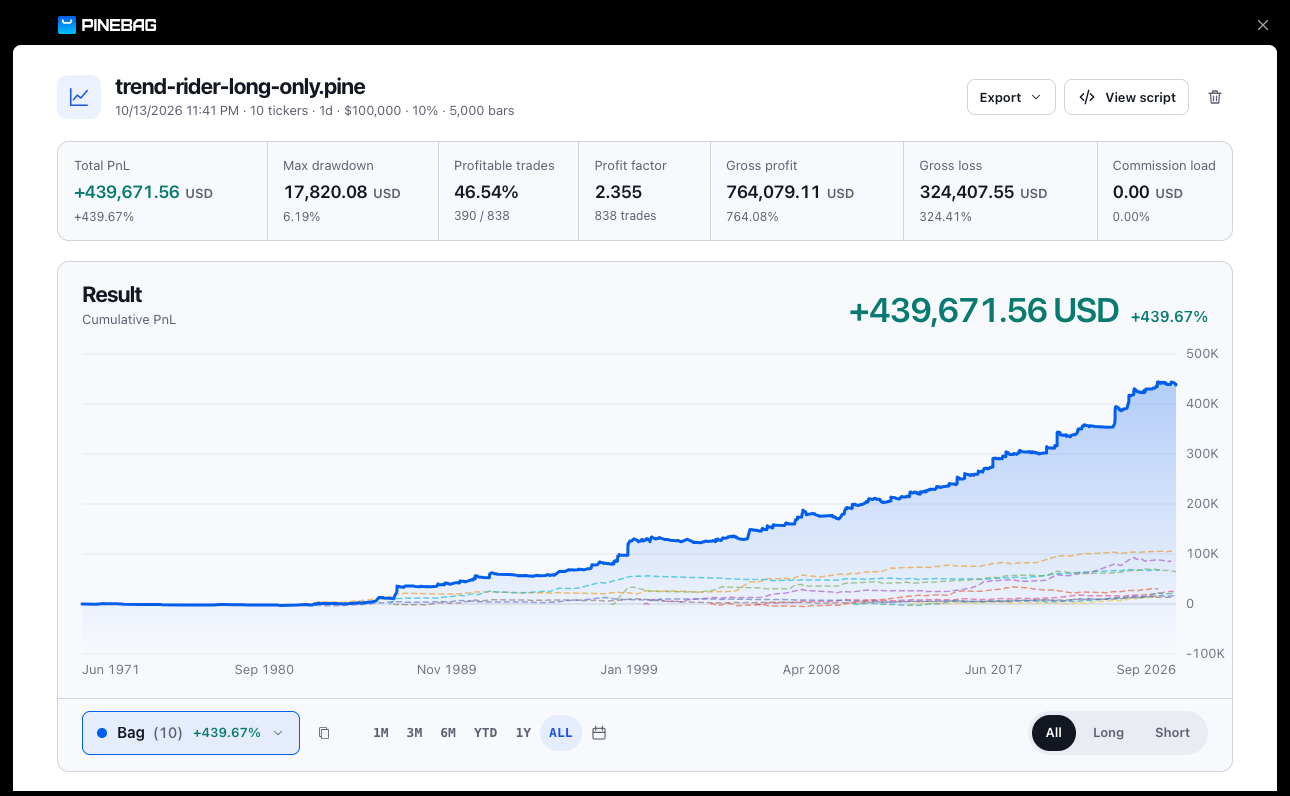
Open, search and remove reports. PineBag stores the latest 50 reports locally and shows a badge for reports not opened yet.
Cumulative PnL, total and per-ticker contribution, key statistics and filters for ticker, Long/Short, preset period or custom dates.
Sort and compare symbol metrics, then copy the ticker list for a new bag or another research tool.
Compare annual and monthly consistency instead of judging only the complete range.
Performance analysis
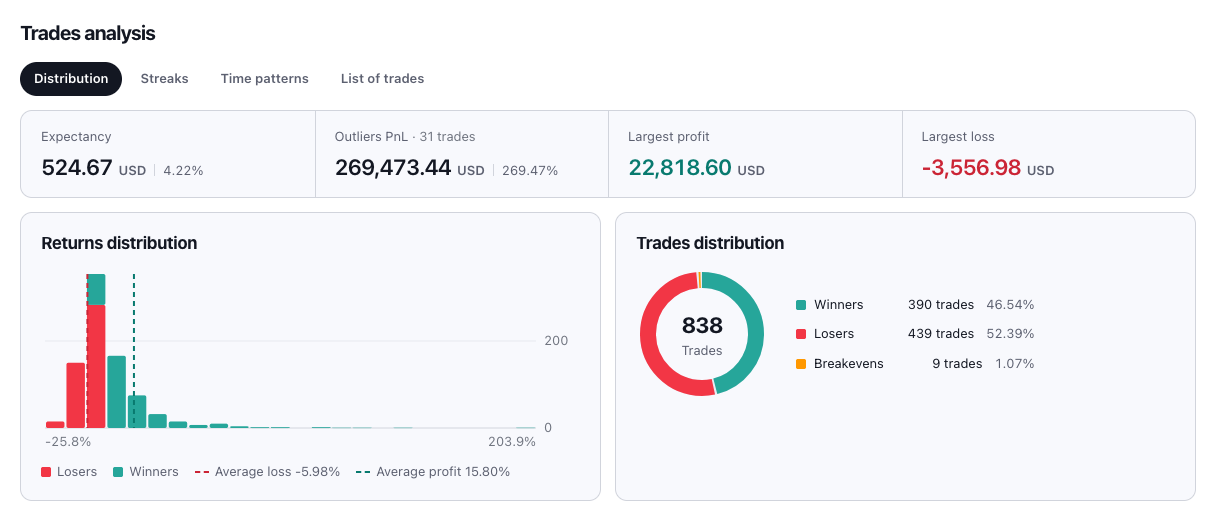
The report separates complementary questions into dedicated views:
- Breakdown — gross profit, gross loss, commission load, signals, trade side and symbol contribution.
- Periodical — performance across calendar periods.
- Benchmarking — strategy return, buy-and-hold return and outperformance.
- Margin usage — maximum and average margin used, plus margin calls when supplied by the report.
- Growth and decline — maximum equity run-up, average winning trade and average losing trade.
Trades analysis

- Distribution — returns, winners, losers, breakevens, average profit/loss, expectancy and PnL outliers.
- Streaks — longest and average winning and losing sequences.
- Time patterns — PnL by entry weekday and hour in UTC.
- Trade table — symbol, side, entry and exit, duration, net PnL and the other fields returned by TradingView.
Exports
Exports the complete stored model, including portfolio values, ticker sections, trades, metadata and the strategy version.
Exports the current trade selection after ticker, direction and period filters are applied.
Settings and accessibility
- Light and dark interface themes shared by the side panel and reports.
- 20 languages matching TradingView order; Arabic and Hebrew use right-to-left layout.
- Metric or US date, time and number formatting.
- Saved-data count and a deliberate remove-all confirmation.
- Keyboard-accessible controls, reduced-motion support and persistent local preferences.
License, privacy and support
- Five-day trial without a card, then a PineBag subscription at $18 per month.
- One key activates up to three devices; a device can be deactivated to free a seat.
- Strategy source, symbol bag and reports stay in the browser. There are no advertising or analytics trackers.
- Authentication data is not included in saved reports or exports.
- License pages show trial days, subscription status, offline confirmation, seats and precise activation errors.
- Support is available for technical, billing, licensing and privacy requests.
Important limitations
Market-data access and Deep Backtesting eligibility always follow the user’s TradingView account. Portfolio aggregation combines per-symbol strategy results; it is not an execution simulator for competing orders against one shared cash balance.